
2/17/2026 Admin
The Agentic Coding Workflow
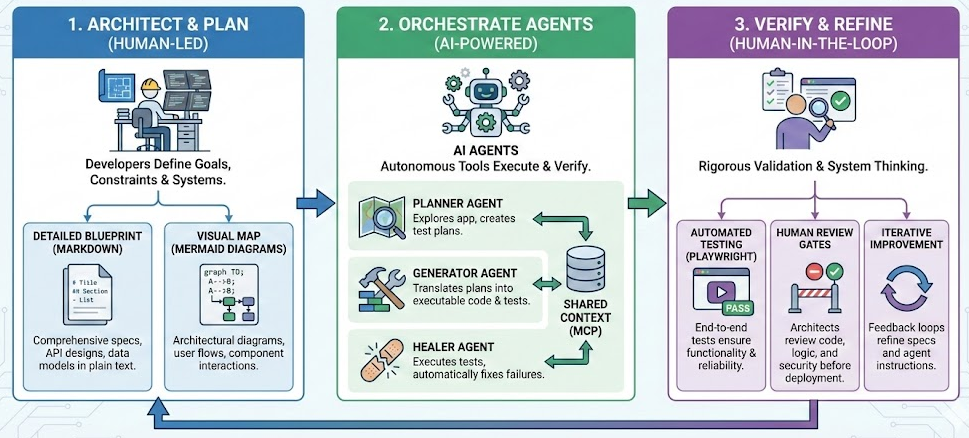
The Agentic Coding Workflow is a structured method where developers act as architects rather than typists. Instead of prompting AI for immediate code, we first demand a detailed blueprint (in Markdown) and a visual map (Mermaid diagrams). We then employ "Agents"—AI tools capable of executing tasks and verifying their own work using testing tools like Playwright—to build the code reliability.
Note: Also see: The Agentic Coding Workflow: A Practical Example.
When I was young "Real Programmers" coded in C++
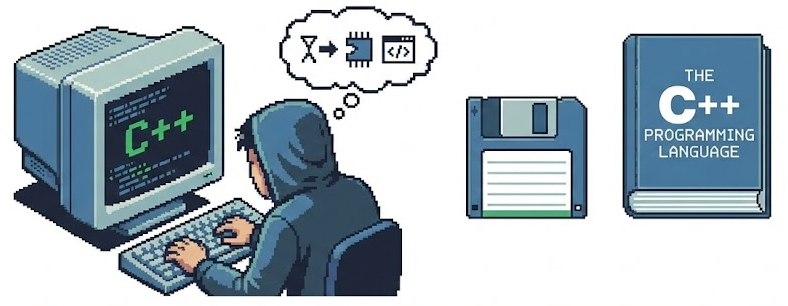
I started programming in Basic and later in Microsoft Access. It was a lot less code, but it was still “coding”.
Today we use AI for coding, but it is still coding—just at a higher level of abstraction. The difference is that we have moved from managing syntax to managing intent.
The "Chat GPT Era" (The Snippet Assembly Line)
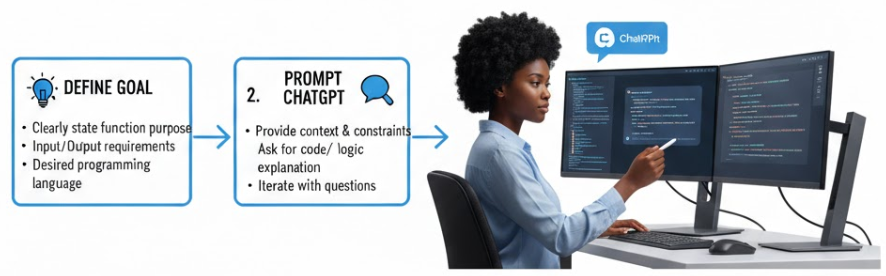
A "long" time ago (three years ago), we started using Chat GPT to write functions and bits of logic. We treated the LLMs like a smarter Stack Overflow.
The Promise: It made writing boilerplate faster and helped unblock specific syntax questions. You could say, "Write a regex to validate an email," and it worked.
The Reality: It still took massive effort to assemble a final application. You were essentially a "senior developer" managing a very fast but forgetful intern who could only write 50 lines at a time. You spent more time reviewing and pasting code than you did designing the solution.
The "Claude Opus Era" (The Vibe Coding Phase)
The Claude Opus LLM changed everything because it possessed a context window large enough to hold an entire application in memory.
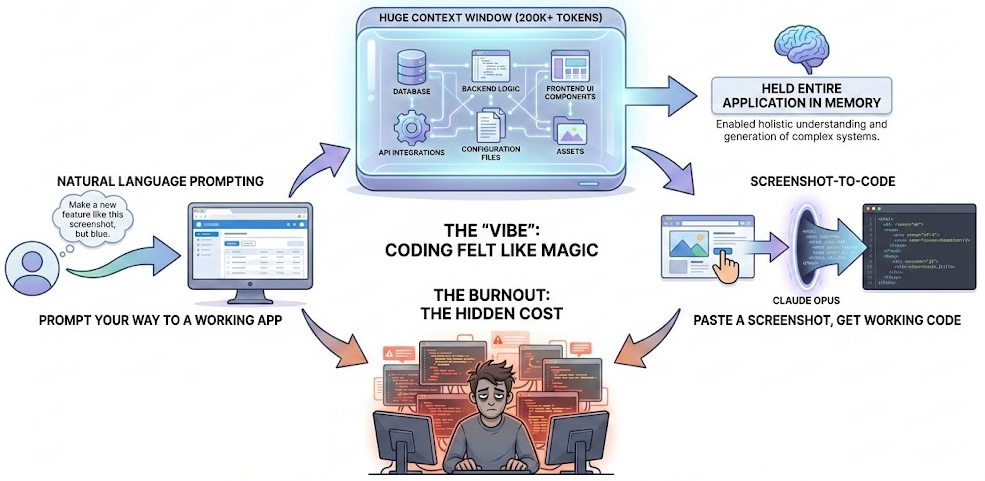
The "Vibe": It felt like magic. You could "vibe code"—prompting your way to a working app without touching a line of code. You could paste in a screenshot and say "Make it look like this," and it actually did.
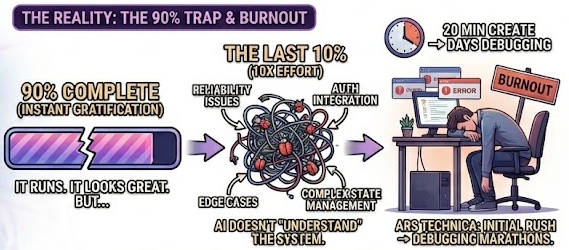
The Burnout: As noted in Ars Technica, this phase often led to burnout. The initial rush of creating an app in 20 minutes was often followed by days of debugging.
-
The "90% Trap": AI gets you to 90% instantly. It looks great. It runs. But the last 10% (reliability, edge cases, auth integration, complex state management) takes 10x the effort because the AI doesn't truly "understand" the system it built.
-
The Management Overhead: You stop being a coder and become a full-time "AI Manager," constantly reviewing code that looks correct but fails subtly when you run it.
I covered "Vibe Coding" in detail in my previous post: Vibe Coding Using Visual Studio Code and Blazor.
The "New" Agentic Coding Workflow
We have now moved to a more structured, robust method called Agentic Coding. This workflow acknowledges that while AI is powerful, it needs a strict plan to succeed. It shifts the AI from a "creative writer" to a "guided engineer."
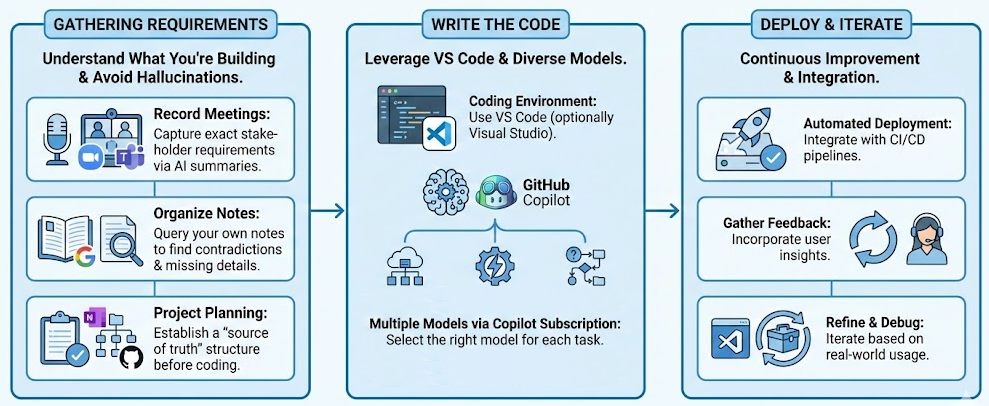
Gathering Requirements
The first step hasn't changed—you need to know what you are building. The biggest cause of "AI hallucinations" is actually just a lack of context.
Here are my methods:
-
Record Meetings: Record your Zoom or Microsoft Teams meetings. Use the AI-generated summary to capture the exact requirements of the stakeholders.
-
Organize Notes: Use GoogleLM or Microsoft CoPilot Notebooks to collate all your notes. These tools allow you to query your own notes to find contradictions or missing requirements before writing a single line of code.
-
Project Planning: Use OneNote or GitHub Issues to structure the project plan. You need a "source of truth" that is not the code itself.
Write the Code
For the coding phase, we use Visual Studio Code (and optionally Visual Studio).
Note: For some reason Visual Studio Code is *much* better at writing AI code than Visual Studio using the exact same models. So I open the project in both at the same time and only use Visual Studio for source control and to run and debug.
I recommend using GitHub Copilot because it gives you access to multiple models under one subscription. Different models have different strengths—Claude is excellent.
The Model matters. Right now, I use Claude Opus 4.6 exclusively.
Vibe Coding vs. Agentic Coding
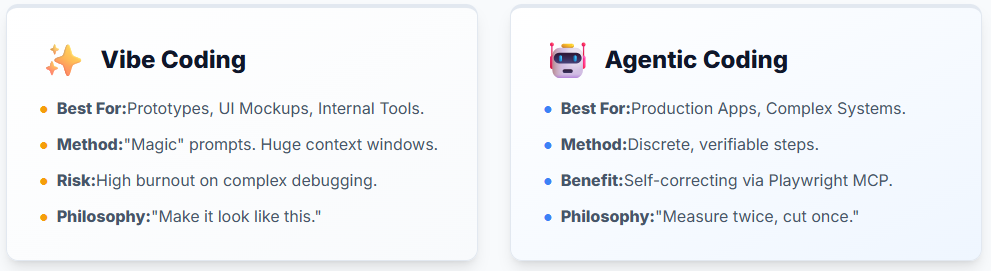
It is important to understand the distinction so you know which tool to reach for.
Vibe Coding:
-
Best for: Prototypes, internal tools, simple scripts, or UI mockups.
-
Method: Uses longer, descriptive prompts. Relies on providing massive context, requirements, style guides, and examples in a single go.
-
The Prompt: You explain "what to do" and "what NOT to do" (e.g., "Use Tailwind, don't use Bootstrap").
-
See my previous post for a deep dive on this.
Agentic Coding:
-
Best for: Production applications, complex systems, and codebases you need to maintain for years.
-
Method: Agentic coding breaks the process down into discrete, verifiable steps. It forces the AI to "measure twice, cut once."
The Agentic Coding Workflow
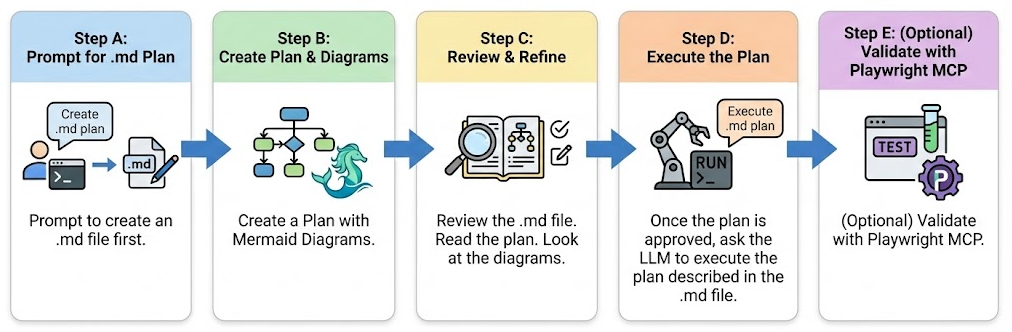
Step A: Prompt to create an .md file first
Do not ask the AI to write code yet.
This is the hardest habit to break. Instead, ask it to create a Markdown (.md) file that describes the features you are working on. This serves as your "spec sheet." It is much cheaper and faster to iterate on a Markdown file than to rewrite a Blazor application multiple times.
This is the prompt I use:
Task:
Create a Markdown file intended to be saved in the docs/ directory. The file should contain a detailed, structured plan for implementing the following features (I will list them after this instruction).Requirements:
Use clear section headings.
Include Mermaid diagrams to illustrate both system structure and process flows.
Provide enough detail that a developer could begin implementing the features based on this document alone.
Use Markdown formatting throughout.
Do not include any file‑system commands; simply output the Markdown content.
Output Format:
Return only the contents of the .md file, starting with a top‑level # heading.Features to document:
[Insert your feature list here]
Step B: Create a Plan with Mermaid Diagrams
In that .md file, ask the LLM to create a detailed technical plan. Explicitly ask it to include Mermaid diagrams to visualize flow, architecture, and state.
Why Mermaid? Because LLMs are text-based, but systems are structural. Forcing the LLM to generate a valid Mermaid diagram forces it to think about the relationships between your components. If the diagram looks like a mess, the code will be a mess.
Also, Mermaid diagrams make it easier for you to follow the logic flow.
Step C: Review and Refine
Review the .md file. Read the plan. Look at the diagrams.
-
Does the database schema make sense?
-
Is the user flow logical?
-
Are we missing error handling?
If the plan is wrong, the code will be wrong. Iterate on the plan until it is perfect. This is where your expertise as a developer shines—you are the architect reviewing the blueprints.
Step D: Execute the Plan
Once the plan is approved, ask the LLM to execute the plan described in the .md file. Because the plan is so detailed, the AI rarely hallucinates here. It is simply following instructions.
Step E: (Optional) Validate with Playwright MCP
This is the game-changer. This is the "Agentic" part.
Ask the Agent to use the Playwright MCP (Model Context Protocol) server to validate the results.
In a traditional workflow, if the code fails, you have to debug it. In an Agentic workflow:
-
The Agent writes the code.
-
The Agent writes a Playwright test.
-
The Agent runs the test.
-
If the test fails, the Agent reads the error, rewrites the code, and runs the test again.
This saves a massive amount of time because the agent will fix its own mistakes. It turns the "90% Trap" into a "99% Complete" reality.
See:
Conclusion
Agentic coding moves us from "hoping the AI gets it right" to "ensuring the AI gets it right."
By forcing a planning phase (Markdown & Mermaid) and using tools like Playwright for self-correction, we reclaim our role as architects and stop being overwhelmed "AI Managers." The goal isn't just to write code faster; it's to write better code that actually works when the "vibe" fades.