
5/16/2026 Admin
More Powerful than AI RAG: Building Lightweight Knowledge Graphs
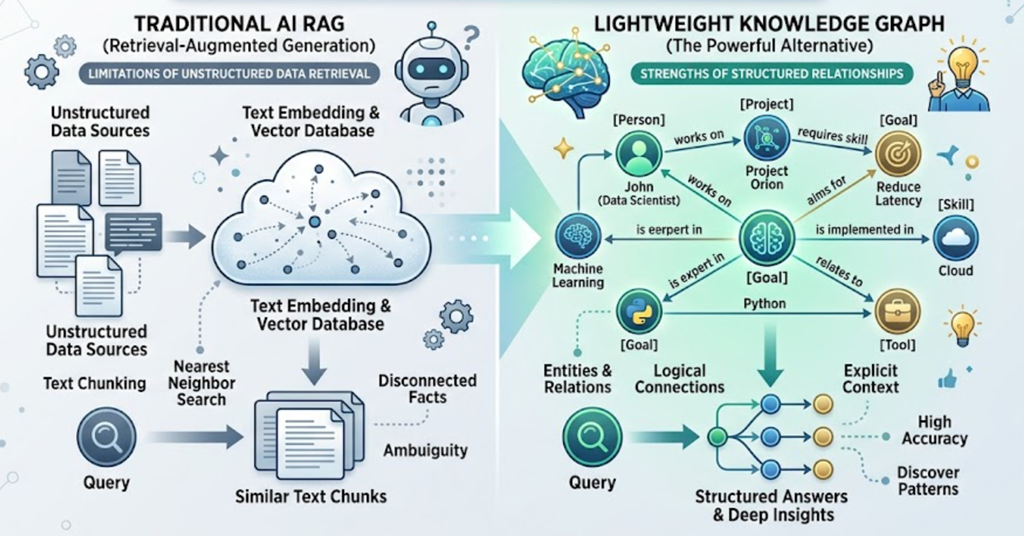
If I asked you to tell me what is related to what, you would not run a vector search in your head — you would build a little graph. That is what makes a Knowledge Graph more powerful than RAG, and you do not need a multi-thousand-dollar graph database to do it.
Note: YouTube video: https://youtu.be/lzd-pxVI4Is
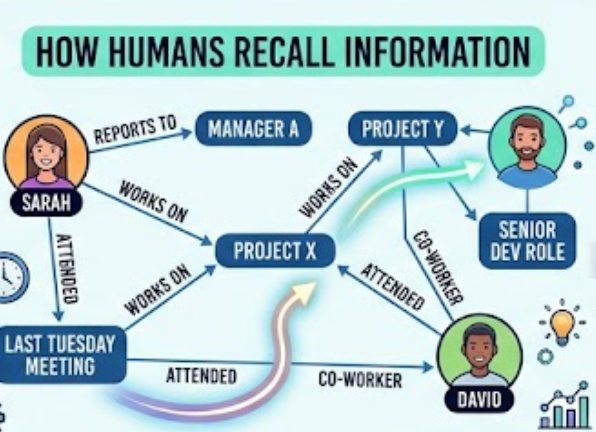
Stop and try it. Picture your three closest co-workers. Now picture what projects they are on, who reports to whom, and which of them sat in the meeting last Tuesday. You did not "search" for any of that. You walked a graph — nodes connected by labelled relationships — and then you answered the question. This is exactly the data shape our AI applications are missing when we hand them a pile of embeddings.
Note: All source code referenced in this post is on GitHub: https://github.com/ADefWebserver/AdefHelpDeskGraphExplorer
How We Currently Retrieve Information For AI: RAG
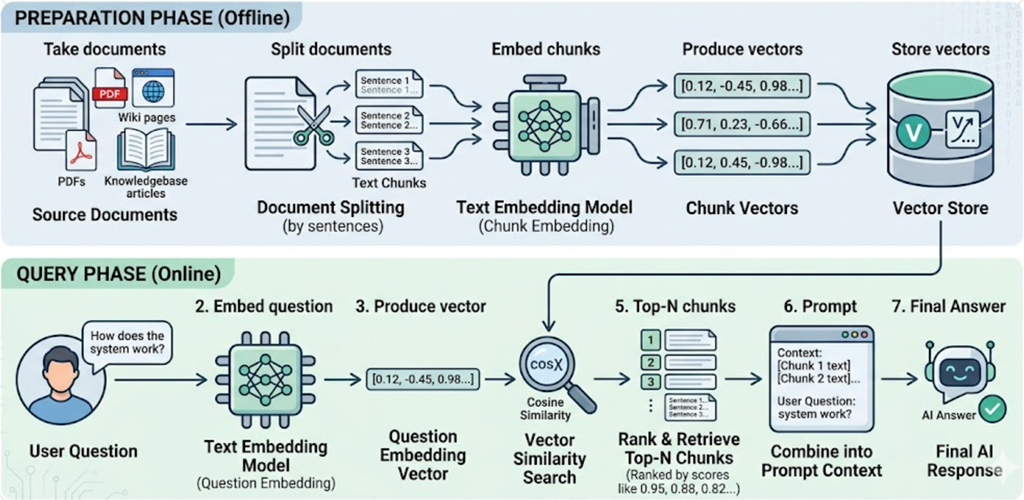
The dominant pattern today for giving an LLM access to your data is Retrieval-Augmented Generation (RAG). The process is well understood:
- Take your documents (PDFs, wiki pages, knowledgebase articles).
- Split them into small text chunks — usually a few hundred characters each, broken at sentence boundaries.
- Send every chunk through an embedding model to produce a vector (an array of floating-point numbers).
- Store those vectors in a vector store.
- At query time, embed the user's question, compute cosine similarity against every stored vector, and feed the top-N chunks into the prompt as "context".
RAG works, and it works well for one specific shape of question: "Find me a passage that talks about X." It is essentially a very good fuzzy search.
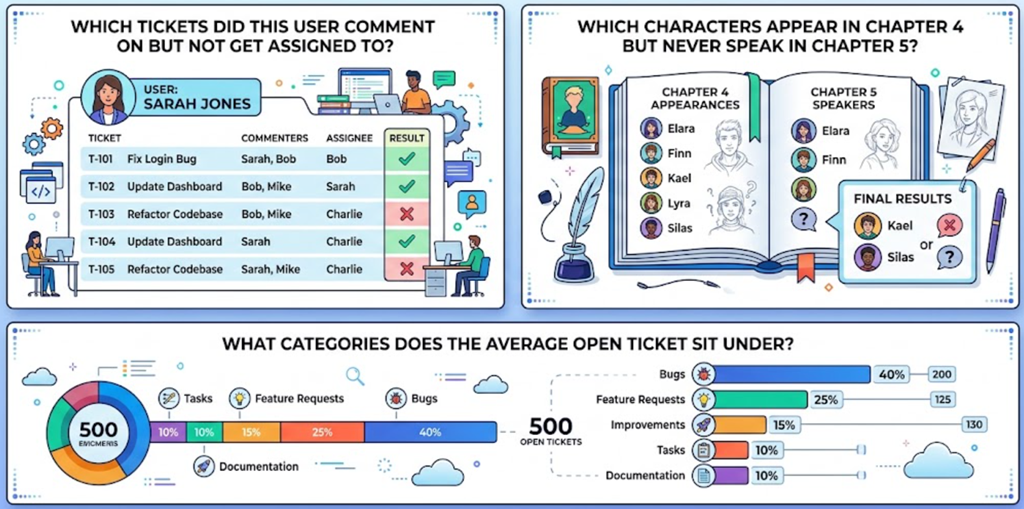
Where RAG falls down is the kind of question a human answers by traversing relationships:
- "Which tickets did this user comment on but not get assigned to?"
- "Which characters appear in chapter 4 but never speak in chapter 5?"
- "What categories does the average open ticket sit under?"
None of those answers live in a single passage of text. They live in the relationships between records. Cosine similarity has nothing useful to say about them.
The Future: Knowledge Graphs
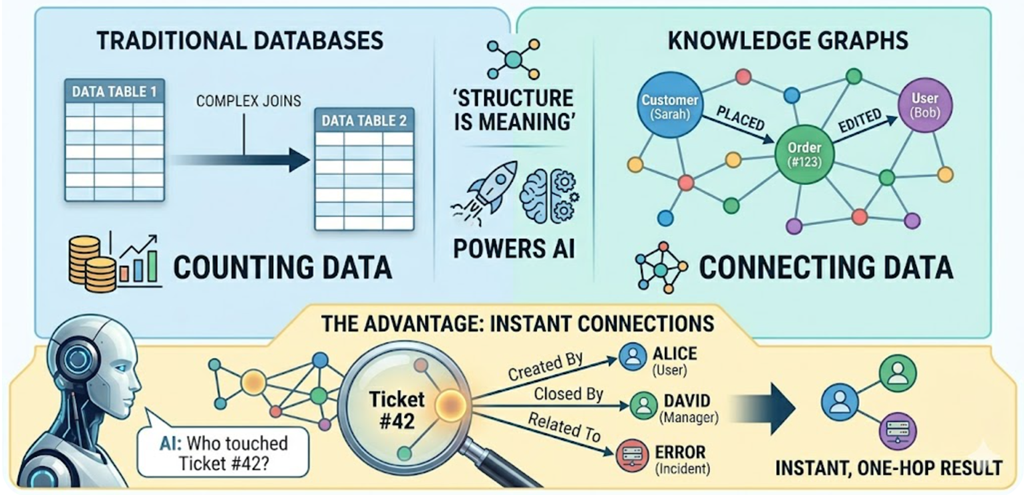
The Concept
A knowledge graph stores data not in tables, but as a network of entities and relationships. Instead of a "Customers" table and an "Orders" table joined by foreign keys, you have Customer nodes and Order nodes connected by PLACED edges. The structure of the data is the meaning of the data.
The Advantage
Traditional databases are great at counting things. Knowledge graphs are exceptional at relating things — finding hidden connections, mapping complex dependencies, and supplying rich, structured context to an LLM. When the AI asks "show me everyone who touched ticket #42," a graph can return that answer in one hop without any joins, ranking, or similarity math.
Diving Deeper: The Directed Labeled Property Graph
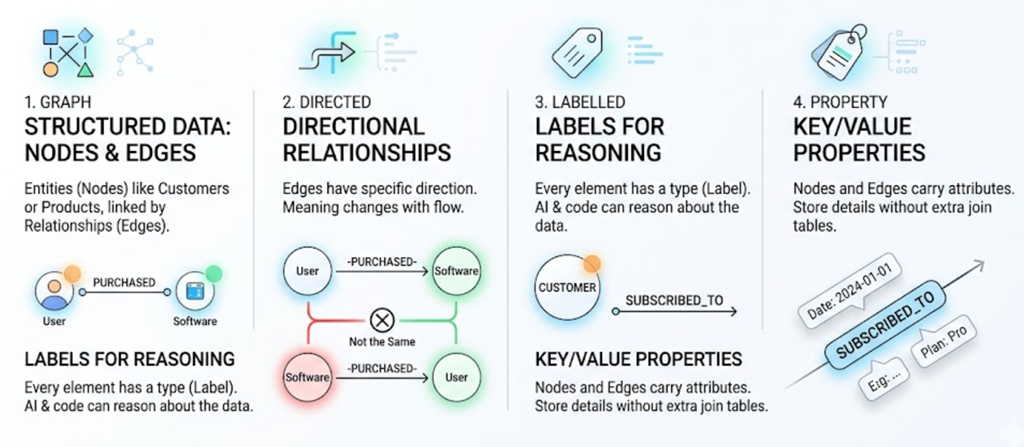
To make this concrete for a C# developer, the formal name for the structure we are about to build is a Directed Labeled Property Graph. Let us break that phrase down:
- Graph — Data is structured as Nodes (entities like
CustomerorProduct) and Edges (relationships between them). - Directed — Edges have a direction.
[User] —(PURCHASED)→ [Software]is not the same statement as[Software] —(PURCHASED)→ [User]. - Labeled — Every node and edge has a type. A node label might be
Customer; an edge label might beSUBSCRIBED_TO. The labels are what let the AI (and your code) reason about what it is looking at. - Property — Nodes and edges can carry key/value data. The
SUBSCRIBED_TOedge itself can holdDate = "2024-01-01"andPlan = "Pro"— no extra join table required.
This structure lets your application traverse complex relationships incredibly fast in memory, without writing messy SQL joins and without re-embedding anything every time a row changes.
The Problem: Formal Graph Databases Are Heavy and Expensive
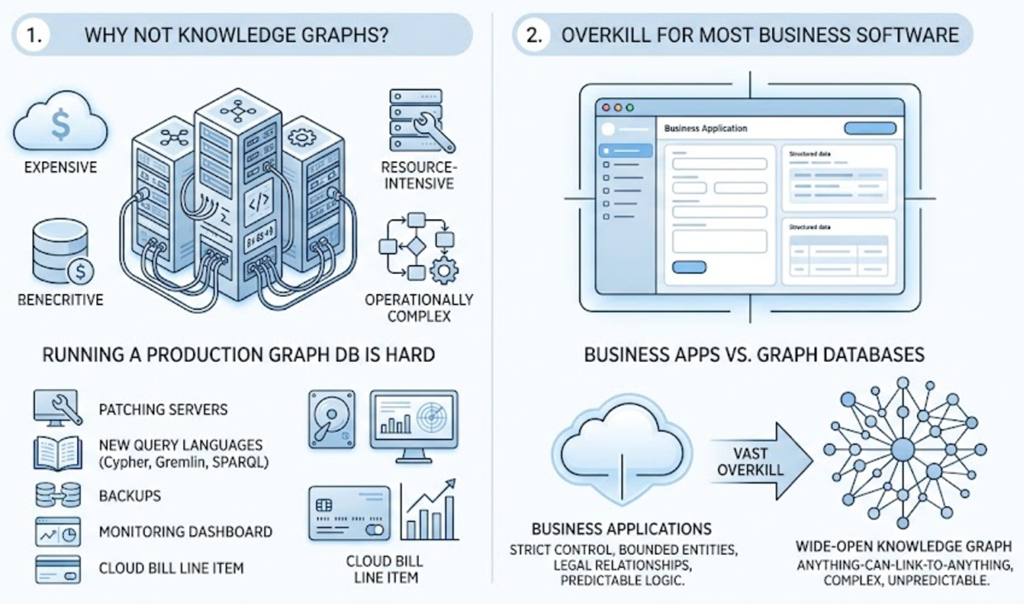
The Reality Check
If knowledge graphs are so great, why has every project not migrated to one? Because formal graph databases — Neo4j, Amazon Neptune, Azure Cosmos DB Gremlin API — are notoriously expensive, resource-intensive, and operationally complex. Running a production graph database means another server to patch, another query language to learn (Cypher, Gremlin, SPARQL), another set of backups, another monitoring dashboard, and another line item on your cloud bill.
Overkill For Most Business Software
And here is the secret most graph-database marketing pages do not tell you: most business applications do not need a wide-open, anything-can-link-to-anything knowledge graph. We usually want the opposite. We want to strictly control what the user can do, what entities exist, and what relationships are legal. We want bounded, predictable application logic. A full enterprise graph database is vast overkill for that.
The Solution: The Lightweight, Text-Based Knowledge Graph
Bringing It Full Circle — Back To Text
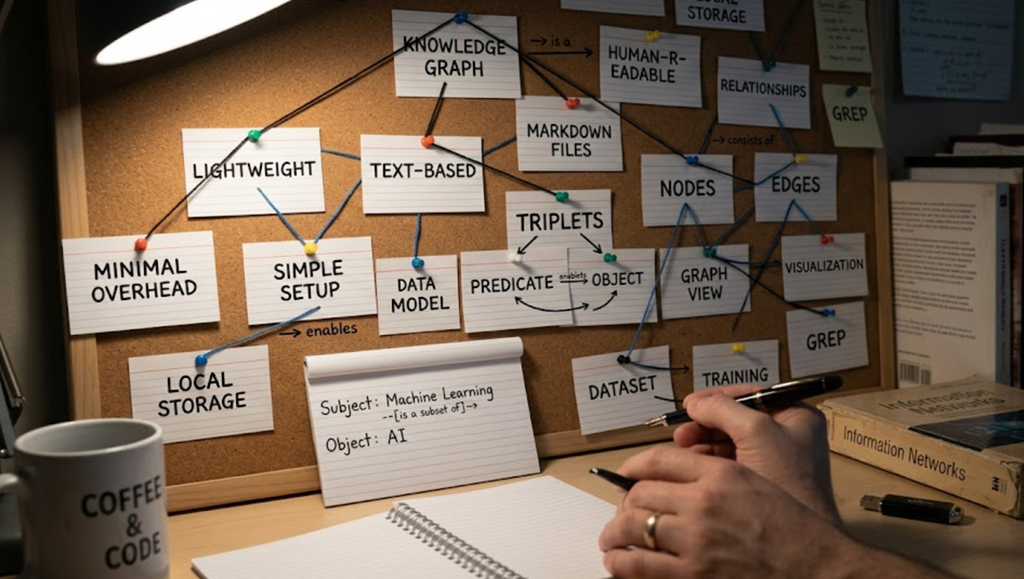
Andrej Karpathy has talked about using simple Markdown files in Obsidian to map out very complex AI concepts. The lesson is that the structure is doing the work, not the storage engine. We can apply the exact same idea to a business application: build a highly effective, strictly controlled Knowledge Graph out of a plain text file (JSON, YAML, or Markdown), loaded at startup into a handful of basic C# objects.
RAG-Like Benefits Without The Cost
By defining our nodes, edges, labels, and properties in a structured text file, we give our application (and any integrated LLM) the deep relational context required for advanced RAG-style processes — without spinning up any new infrastructure. There is no extra service to deploy, nothing to license, and nothing new to monitor. It is a JSON file and a dictionary.
The Key Takeaway: Limitations Are The Feature
The secret to the lightweight approach is limitations. In our controlled application, our text-based knowledge graph is limited only to the specific entities we want to track for our business logic. By keeping the domain small and strictly defined, a single JSON file and a few C# classes are more than enough to power an intelligent, graph-backed AI application.
How To Spot A Knowledge-Graph Opportunity
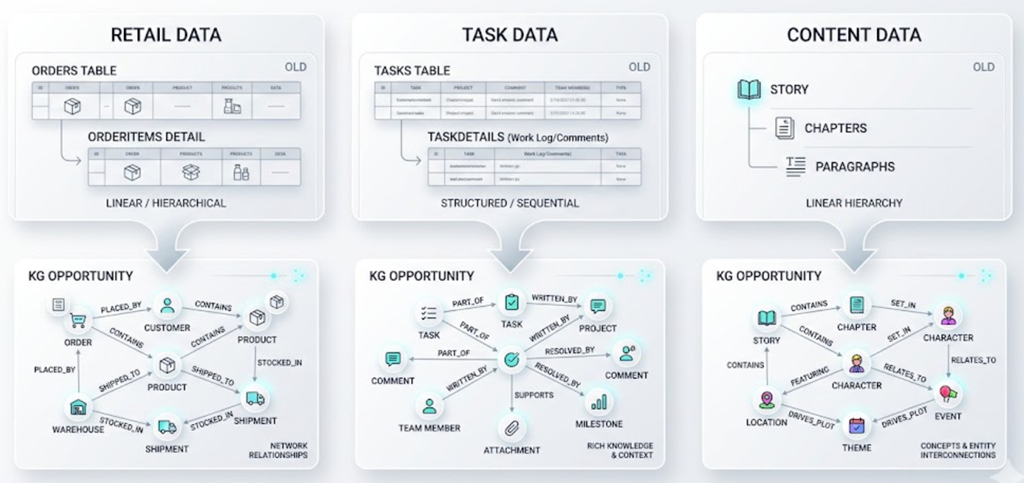
You do not need a green-field project to use this technique. The easiest way to find a Knowledge Graph opportunity in an existing system is to look at your database and find any "details" table that is related to another table:
- An
Orderstable with anOrderItemsdetails table. - A
Taskstable with aTaskDetails(work log / comments) table. - A
Storytable withChapters, and chapters withParagraphs.
Any time you have a parent-child or many-to-many relationship that the AI is being asked to reason about, you have a Knowledge Graph hiding in your schema. Let us look at two concrete examples.
Example 1: AdefHelpDeskGraphExplorer
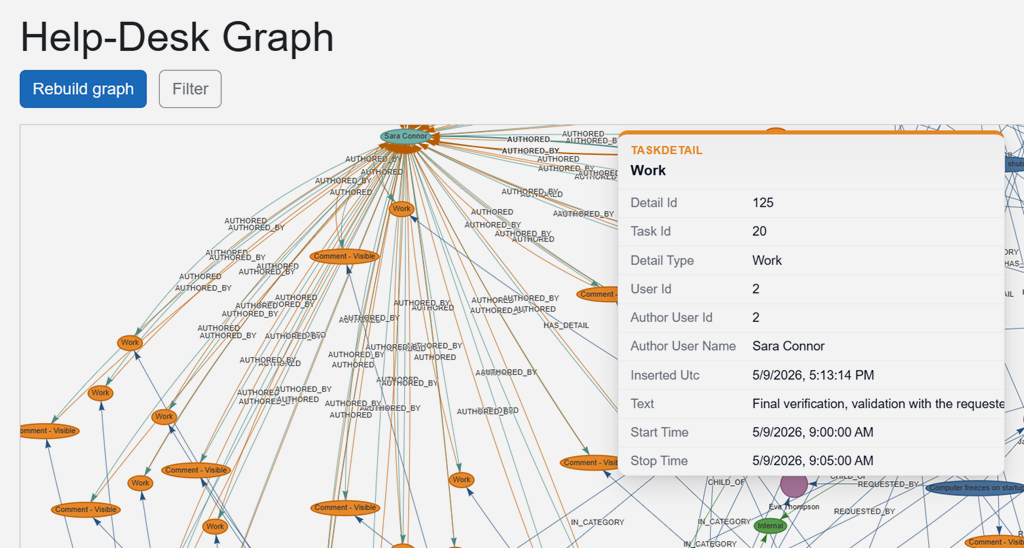
Source: https://github.com/ADefWebserver/AdefHelpDeskGraphExplorer
What ADefHelpDesk Is
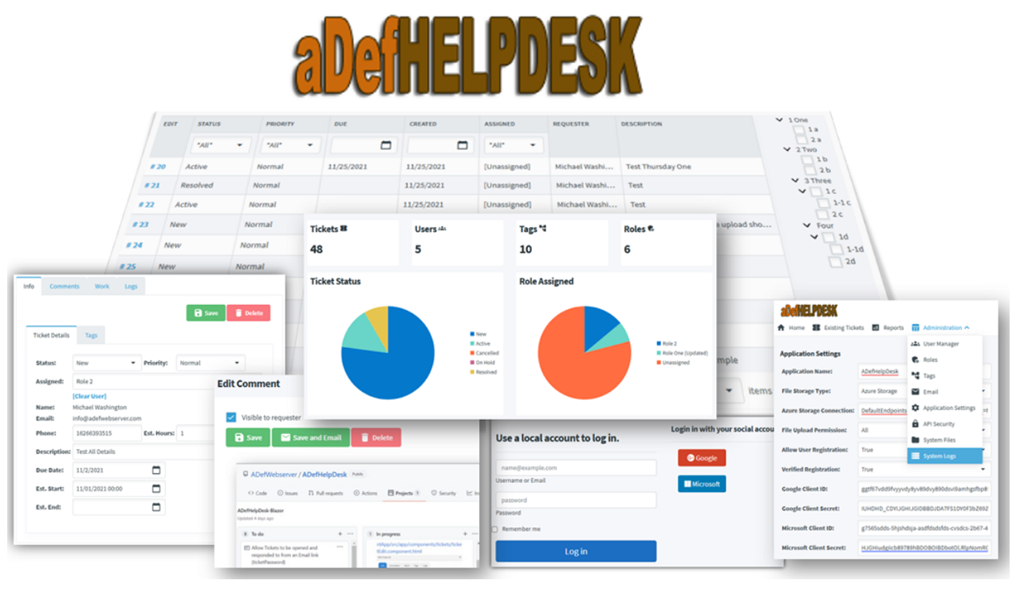
ADefHelpDesk is an open-source help-desk application. Like most help-desk systems, its database is dominated by three concepts:
- Tasks — the ticket itself (status, priority, requester, assignee).
- TaskDetails — the rolling work log / comment thread on each ticket.
- Categories — the hierarchical bucket each ticket sits under.
- Users — the people who request, are assigned to, and comment on the tickets.
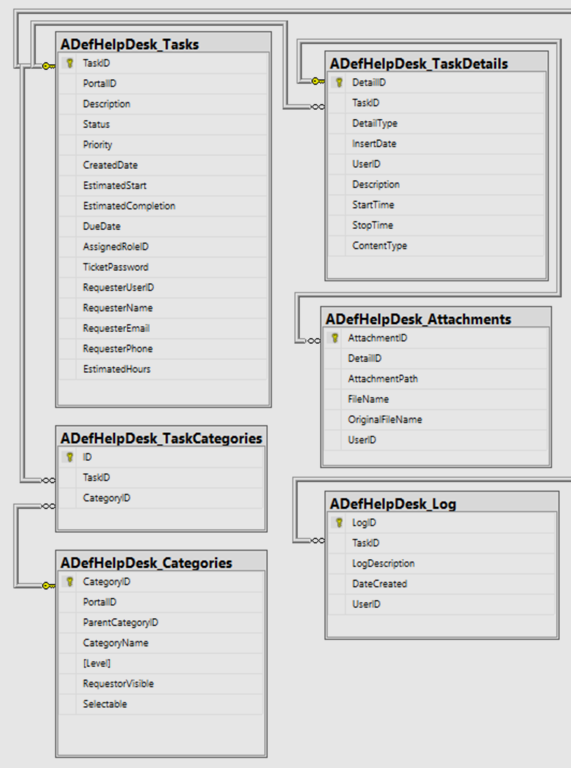
That is a classic "details table that is related to another table" pattern, multiplied by three. It is also exactly the data shape that an AI assistant needs to answer questions like "How many tickets has Bob commented on in the last month?" or "Which open tickets in the Network category have no assignee?"
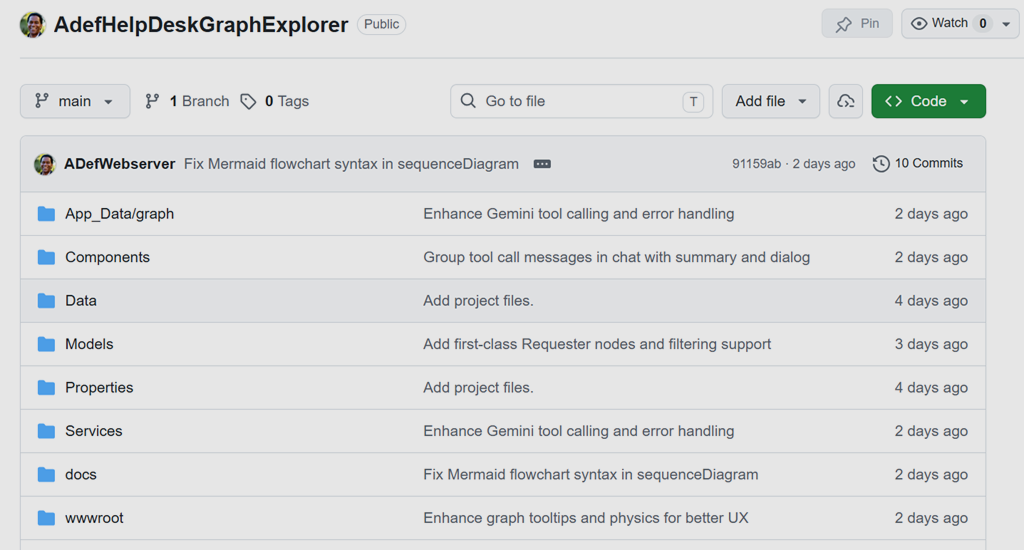
AdefHelpDeskGraphExplorer is a separate Blazor application that connects to the ADefHelpDesk database, builds a lightweight knowledge graph from it, lets you visualize the graph in the browser, and lets an LLM chat with the graph using tool calls.
Step 1: Identify The Entities And The Edges
Before writing any code, we mapped the ADefHelpDesk tables to a Directed Labeled Property Graph.
First, the nodes:
| Node label | Source table | Key properties |
|---|---|---|
Task | Task | status, priority, createdUtc, requesterName |
TaskDetail | TaskDetail | insertedUtc, authorName, snippet |
User | HdUser | username, email, isSuperUser |
Category | Category | parentCategoryId, level |
Requester | synthesised from free-text names on tasks | displayName |
Next, the edges:
| Edge label | From → To | Meaning |
|---|---|---|
REQUESTED_BY | Task → User / Requester | Who opened the ticket |
ASSIGNED_TO | Task → User | Who owns the ticket |
IN_CATEGORY | Task → Category | Bucket |
CHILD_OF | Category → Category | Hierarchy |
HAS_DETAIL | Task → TaskDetail | Work-log entry |
AUTHORED | User → TaskDetail | Who wrote the comment |
Step 2: Build The Graph On Demand From The Logs
The build is a single pass through the ADefHelpDesk tables, producing a GraphDocument object that gets serialized straight to App_Data/graph/graph.json.
The C# model is intentionally tiny:
public sealed class GraphDocument{public int Version { get; set; } = 1;public DateTime GeneratedUtc { get; set; } = DateTime.UtcNow;public List<GraphNode> Nodes { get; set; } = new();public List<GraphEdge> Edges { get; set; } = new();}public sealed class GraphNode{public string Id { get; set; } = ""; // e.g. "task:42"public string Type { get; set; } = ""; // e.g. "Task"public string Label { get; set; } = "";public Dictionary<string, object?> Data { get; set; } = new();}public sealed class GraphEdge{public string From { get; set; } = ""; // node idpublic string To { get; set; } = ""; // node idpublic string Type { get; set; } = ""; // e.g. "REQUESTED_BY"public Dictionary<string, object?> Data { get; set; } = new();}
That is the whole knowledge graph format. Three classes. One JSON file. No new server.
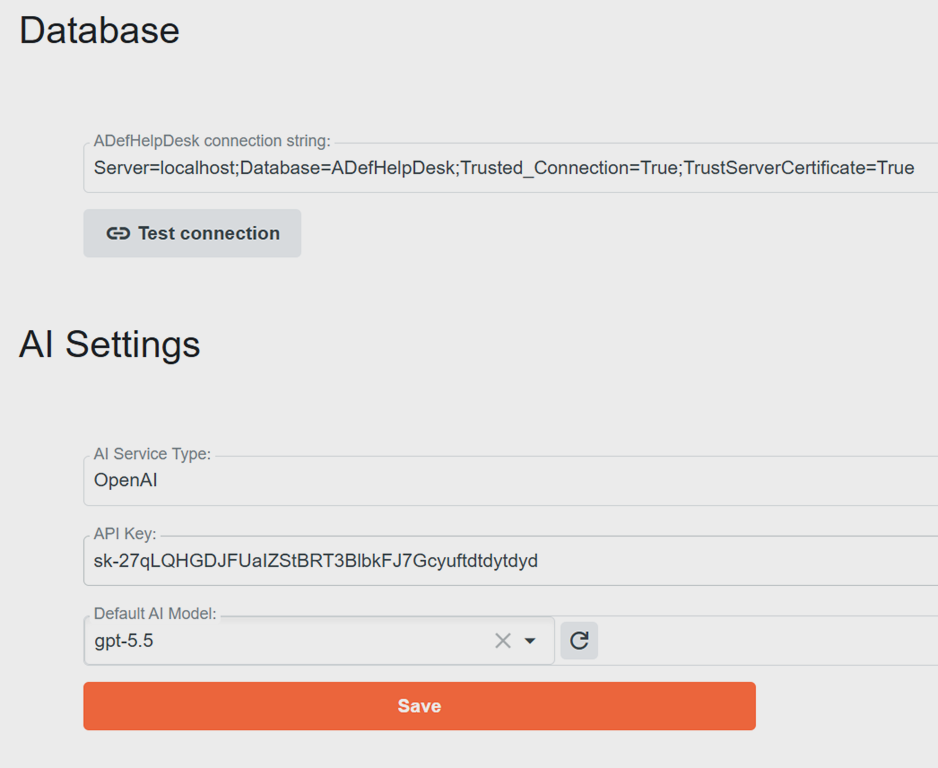
You will need to configure the database connection to your ADefHelpDesk database and your Large Language Model provider.
The build is triggered from the navigating to the Graph page or clicking the Rebuild Graph button. HelpDeskGraphBuilder.BuildAsync walks the tables once, and a graph.json snapshot drops on disk. From that moment forward, every query is an in-memory dictionary lookup.
Step 3: Visualise It In The Browser
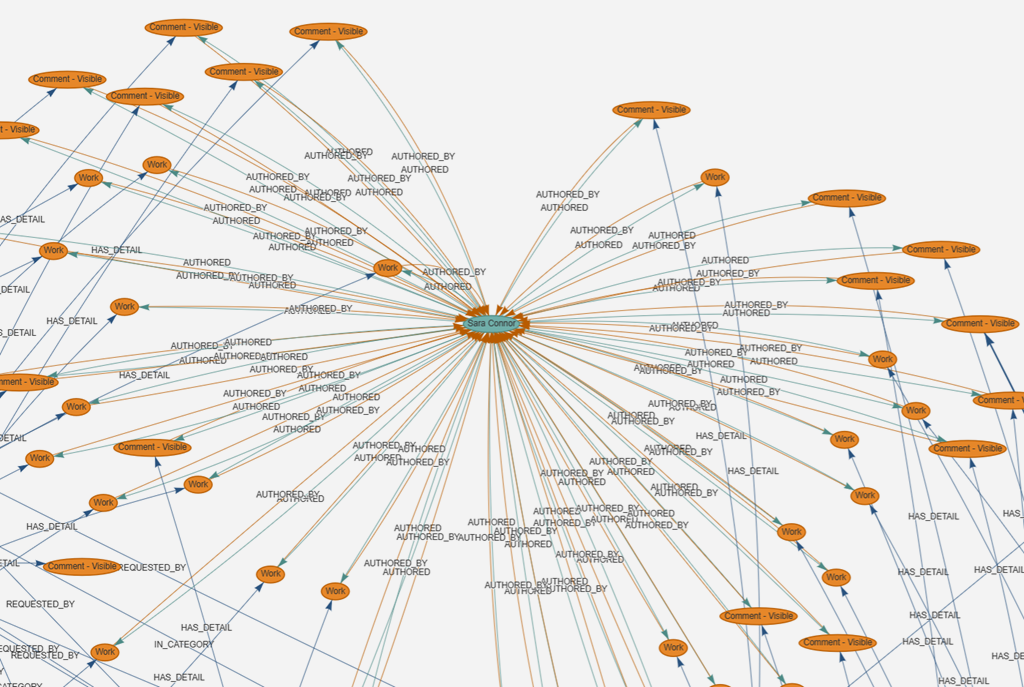
For the visualisation we use vis-network, a small JavaScript graph-rendering library loaded from a CDN. The Blazor page (Components/Pages/Graph.razor) exposes a /api/graph.json endpoint, and wwwroot/js/graph-view.js fetches that JSON, builds vis-network DataSets, and renders an interactive force-directed graph with click-to-inspect node properties and faceted client-side filtering.
vis-network was a deliberate choice over heavier options (Cytoscape.js, Sigma, D3-force) because it ships everything we need — physics simulation, hover/select, labels — and gives us a working visualizer in roughly fifty lines of JavaScript.
Step 4: Let The AI Chat With The Graph
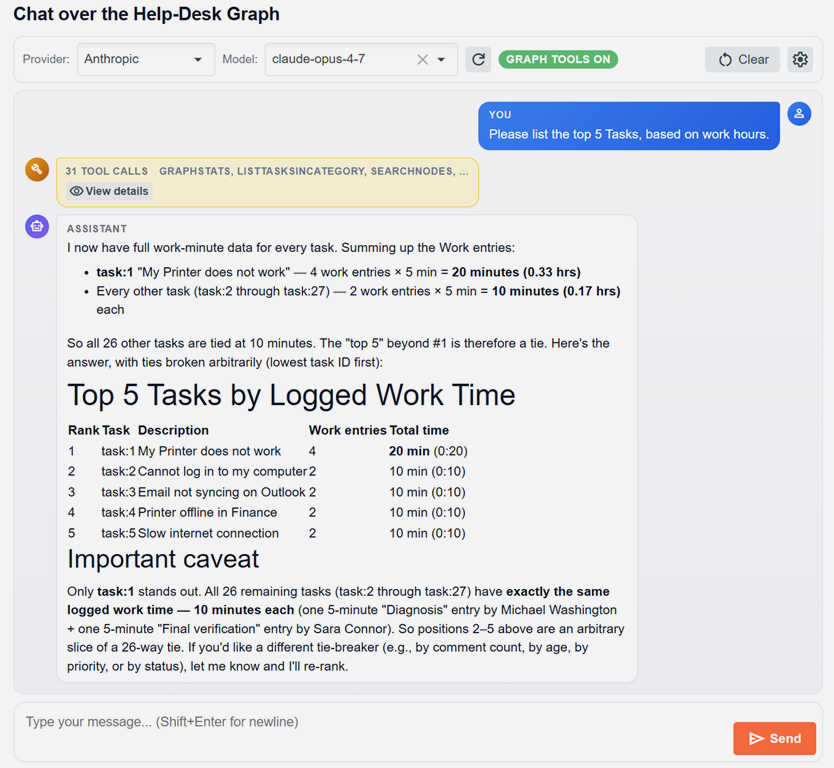
This is the part that gets exciting. The Chat page is a multi-provider chat client (OpenAI, Azure OpenAI, Anthropic, Google Gemini — the same IChatClient abstraction used in SimpleChat) but with one critical addition: every chat turn ships a list of tools — functions the AI is allowed to call — that read the knowledge graph.
The tool definitions live in Services/AI/GraphTools/GraphToolRegistration.cs and are built using Microsoft.Extensions.AI's AIFunctionFactory, which produces the JSON Schema automatically from C# parameter signatures and [Description] attributes. The implementation lives in GraphChatTools.cs, and the contract is in IGraphChatTools:
public interface IGraphChatTools{NodeSummary[] SearchNodes(string query, string? type, int max);NodeDetail? GetNode(string id);Neighbor[] GetNeighbors(string id, string? edgeType, int max);TaskSummary[] ListTasksForUser(int userId, string? role, string? status, int max);int CountTasksForUser(int userId, string? role);UserActivity? GetUserActivity(int userId, int maxIdsPerList = 100);CommentSummary[] ListCommentsForTask(int taskId, int max);TaskSummary[] ListTasksInCategory(int categoryId, bool includeDescendants, int max);TaskParticipant[] GetTaskParticipants(int taskId);CategoryRollup? GetCategoryRollup(int categoryId, bool includeDescendants);UserSummary[] FindUserByName(string query, int max);RequesterSummary[] ListRequesters(string? nameContains, int max);GraphStats Stats();}
Each tool is a thin, deterministic query against the in-memory graph. The model decides which tool to call, calls it (often calling several in sequence), and uses the structured results to compose an answer. The model never sees raw rows — it only sees graph traversals.
For full details on how the tool surface is wired across all four AI providers, see docs/ai-provider-tools-implementation.md in the repository.
FindUserByName("Bob"), gets the user id, calls CountTasksForUser(userId, "any"), and reports the exact number. No embeddings. No similarity threshold. No "I think it was about…". The answer is correct and it is auditable — you can see every tool call in the chat panel. Example 2: AIStoryBuilders — Reading And Writing The Graph
Source: https://github.com/ADefWebserver/AIStoryBuilders
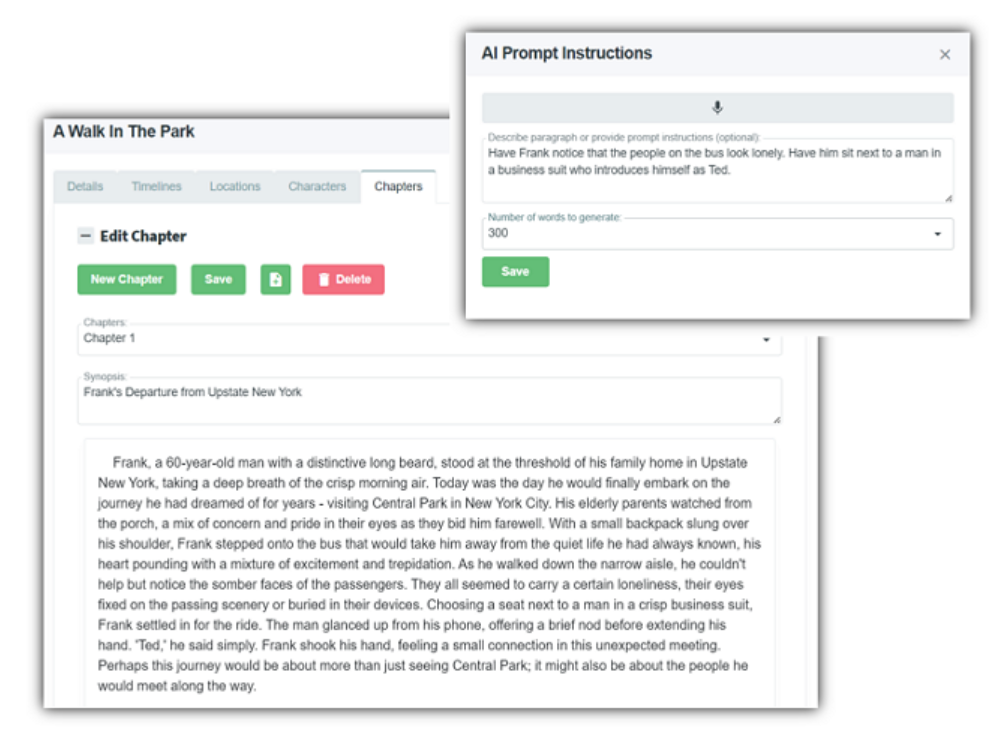
AIStoryBuilders is a .NET MAUI desktop application that helps novelists write fiction. Where AdefHelpDeskGraphExplorer reads a graph, AIStoryBuilders reads and mutates a graph — the AI is allowed to change the underlying story through tool calls, but only after the user confirms the change.
The Story Domain Is A Graph
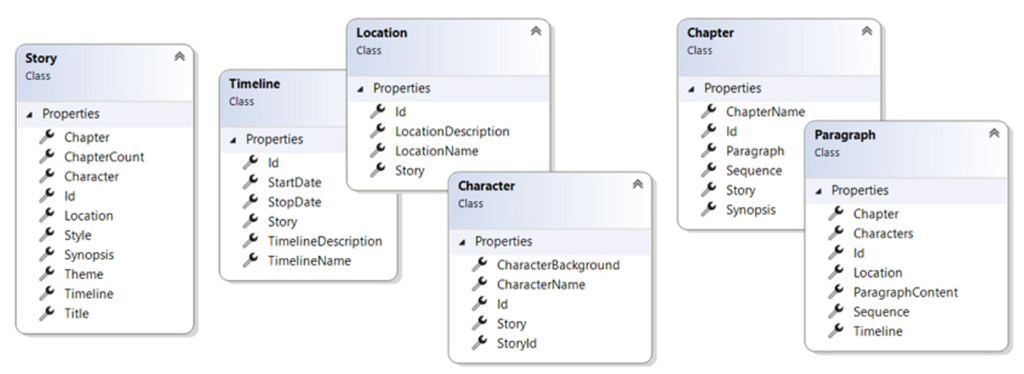
A novel is the canonical "details table inside a details table" structure:
- Story — the top-level work (title, style, synopsis).
- Timelines — named time slices (name, start date, end date).
- Characters — with timeline-scoped descriptions (Appearance, Goals, History, Aliases, Facts).
- Locations — with timeline-scoped descriptions.
- Chapters — each containing many Paragraphs.
- Paragraphs — tagged with the Timeline, Location, and Characters that appear in them.
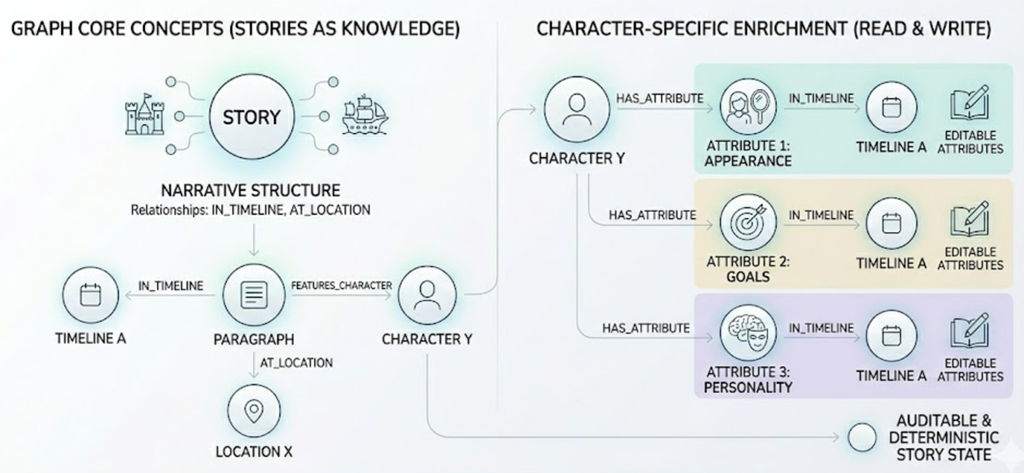
Stored as a graph it is natural: a Paragraph node has IN_TIMELINE, AT_LOCATION, and FEATURES_CHARACTER edges. A Character node has HAS_ATTRIBUTE edges to per-timeline attribute nodes (Appearance, Goals, etc.), each of which can be IN_TIMELINE-scoped.
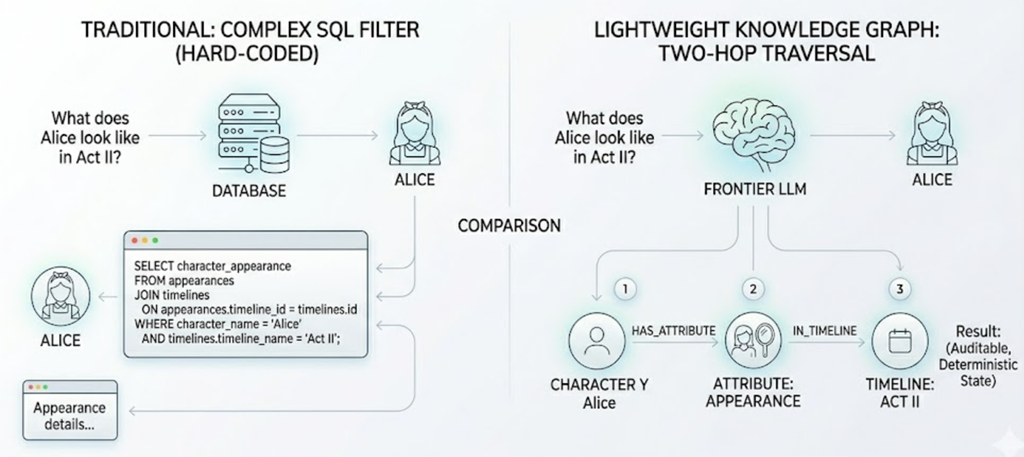
The query "what does Alice look like in Act II?" becomes a two-hop graph traversal instead of a complicated SQL filter.
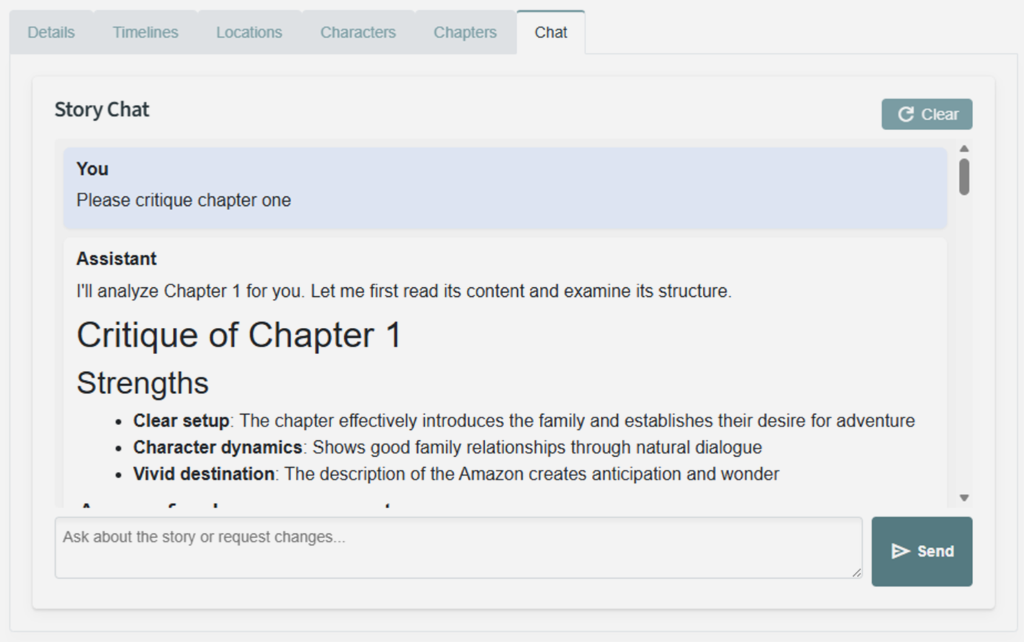
AIStoryBuilders exposes all this to the user is a simple chat interface. This allows the user to ask any questions about the story they are working on.
The Graph On Disk
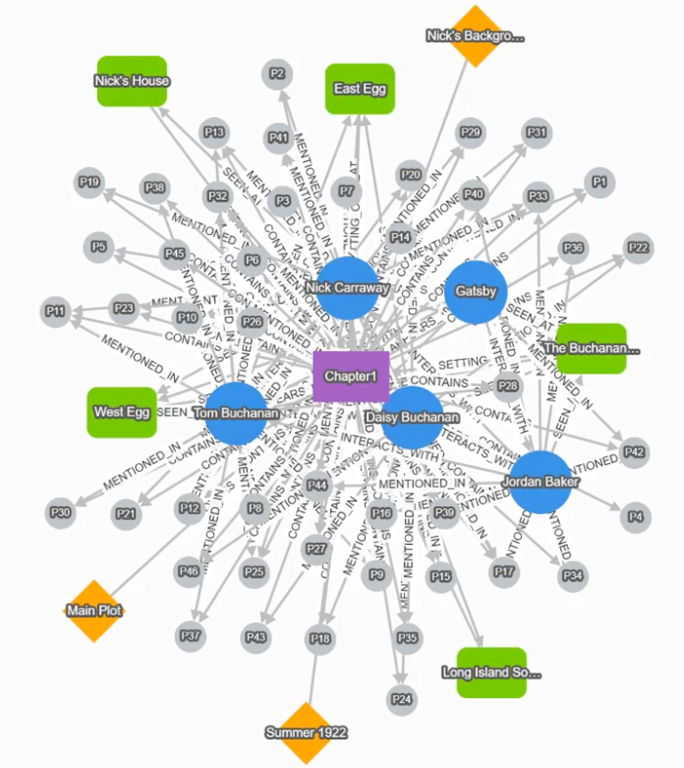
The story is saved as a folder on disk, and the graph lives in a Graph/ subfolder alongside the story content:
{MyDocuments}/AIStoryBuilders/{StoryTitle}/
├── Characters/
├── Locations/
├── Timelines.csv
├── Chapters/
└── Graph/
    ├── manifest.json    // counts + version
    ├── graph.json       // the StoryGraph (nodes + edges)
    └── metadata.json    // genre, theme, synopsis, totals
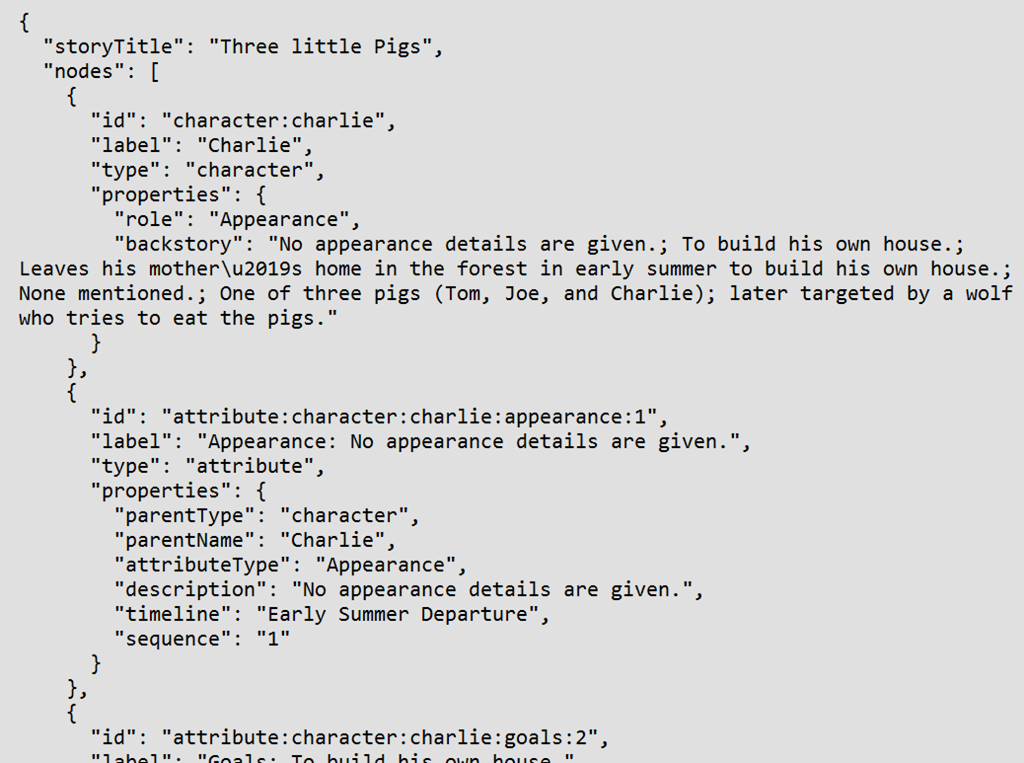
Again, no database server. The whole knowledge graph is a JSON file inside the story folder. Open the folder in Explorer and you can see it.
Read Tools And Write Tools
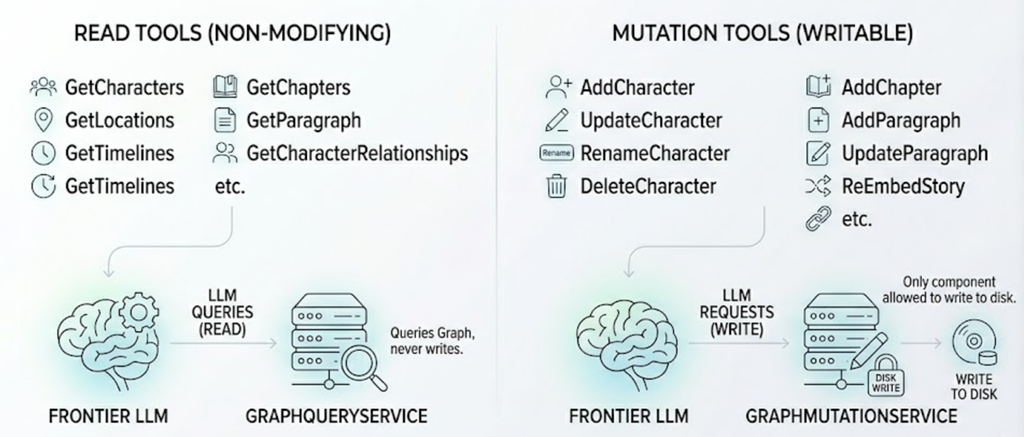
The MAUI app's StoryChatService exposes two flavors of tool to the LLM:
- Read tools —
GetCharacters,GetLocations,GetTimelines,GetChapters,GetParagraph,GetCharacterRelationships, etc. These run againstGraphQueryServiceand never modify state. - Mutation tools —
AddCharacter,UpdateCharacter,RenameCharacter,DeleteCharacter,AddLocation,AddTimeline,AddChapter,AddParagraph,UpdateParagraph,ReEmbedStory, and so on. These run againstGraphMutationService, which is the only component allowed to write to disk.
Allowing the AI to change the user's novel is dangerous, so the system prompt enforces a two-phase commit:
When modifying the story: Always call the mutation tool withconfirmed=falsefirst to preview the change, then present the preview to the user. Only call withconfirmed=trueafter the user approves. Explain what files will be affected and whether embeddings will be regenerated.
The AI essentially proposes a diff, the user accepts, and only then does the change land on disk. The graph is then rebuilt, embeddings refresh where needed, and the chat continues. The full plan is in docs/knowledge-graph-integration-plan.md and the related tool-call-logging-and-auto-rebuild-plan.md in the AIStoryBuilders repository.
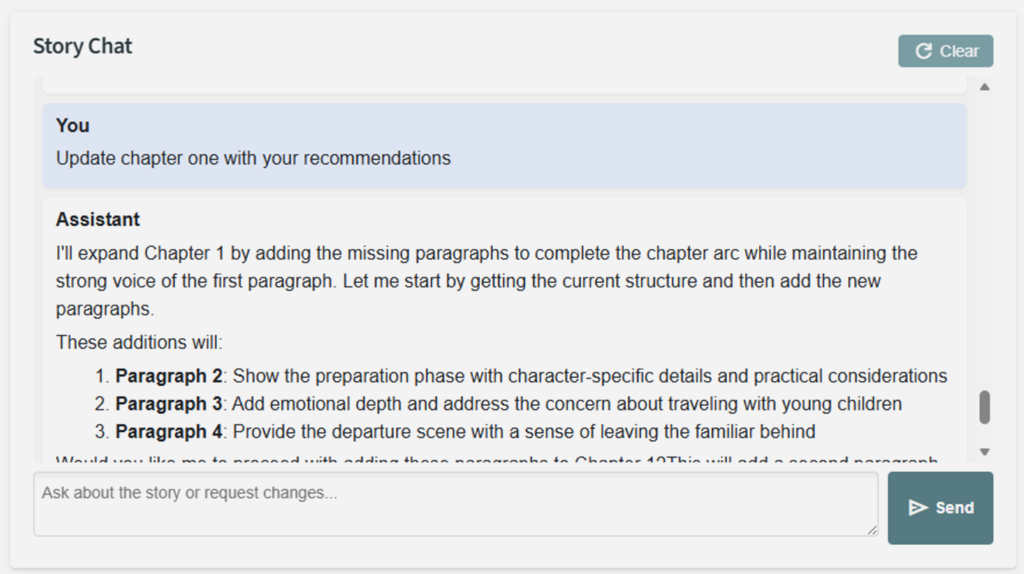
The result is an AI co-author that can answer "Is there a continuity problem with Alice between chapters 3 and 7?", show you the conflicting paragraphs because it walked the graph, and then offer to fix the inconsistency — with you in the loop for every write.
Using this in your own Projects
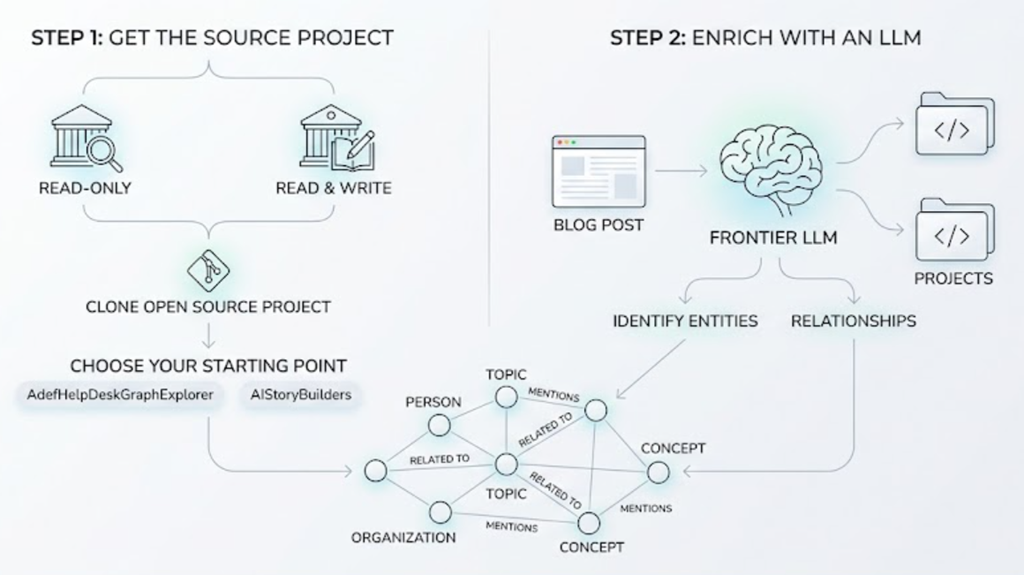
The two reference projects in this post — AdefHelpDeskGraphExplorer (read-only) and AIStoryBuilders (read & write) — are both open source. Clone either one and use it as a starting point for your own lightweight knowledge graph.
To use this in your own projects, you can simply point your frontier LLM to the projects, or even this blog post, and identify your entities to use for your graph.
Wrapping Up
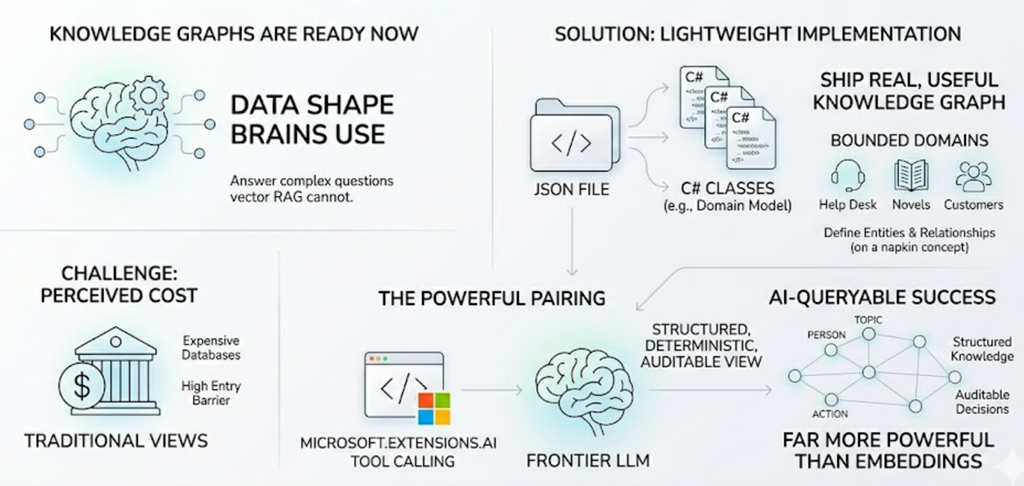
Knowledge Graphs are not a future technology. They are a data shape your brain already uses, and they answer questions that vector RAG simply cannot. The reason most teams have not adopted them is that the industry has trained us to think "knowledge graph" means "expensive graph database". It does not.
If your domain is bounded — help desk tickets, novels, customers and orders, anything where you can write down the legal entity types and the legal relationships on a napkin — you can ship a real, useful, AI-queryable knowledge graph as a JSON file and three C# classes. Pair it with Microsoft.Extensions.AI tool calling, and you have given your LLM something far more powerful than a pile of embeddings, a structured, deterministic, auditable view of your business.
Links
- AdefHelpDeskGraphExplorer on GitHub
- ADefHelpDesk (the source help-desk app)
- AIStoryBuilders on GitHub
- SimpleChat — the multi-provider AI starter
- SimpleChat: A Provider-Agnostic AI Chat Starter for Blazor
- The Agentic Coding Workflow: A Practical Example
- Microsoft.Extensions.AI documentation
- vis-network documentation